How Data Transfer Rates Are Calculated
Three months ago, I watched a seasoned IT director nearly launch his keyboard across the room. We were orchestrating a massive migration—moving three terabytes of vital customer data to a new Amazon Web Services server over a brand new “Gigabit” connection. He expected the transfer to be complete in a neatly scheduled lunch hour.
Three hours later, we were still staring at a progress bar hovering maliciously at 60 percent.
“The math isn’t mathing,” he groaned, pointing at the numbers. “I’m paying for a thousand megabits a second. Why is this crawling?”
Here is what nobody tells you about digital infrastructure: the numbers you see advertised are almost never the numbers you will experience in reality. The entire telecommunications industry speaks a different language than the software running on your computer. If you don’t understand how data transfer rates are calculated, you will miscalculate deadlines, overpay for hardware you don’t need, and spend countless hours troubleshooting a completely healthy network.
In this comprehensive guide, I’m pulling back the curtain on how data fundamentally moves. You’ll discover the exact formulas professionals use, why your actual speed is always lower than your advertised speed, and how to instantly convert between units without feeling like you need a mathematics degree.
What Is a Data Transfer Rate?
Data isn’t magic. It is physical electricity pulsed over copper wires, sequenced flashes of light traversing fiber optic glass, or engineered radio waves cutting through the air. A data transfer rate simply measures how quickly those physical manifestations of information move from a source to a destination.
Definition of Data Transfer Rate
A data transfer rate is the speed at which a given amount of digital data is transmitted from one location to another within a specific time frame.
Imagine water flowing through a plumbing system. The transfer rate isn’t the total amount of water in the reservoir, nor is it the water pressure. It is specifically the volume of water exiting the pipe every single second. In the digital world, we measure data volume instead of water volume, and we use fractions of a second as our baseline.
If a system moves a digital file from a web server in Virginia to your laptop in London at a rate of 25 Megabytes per second, that is your data transfer rate.
Why Data Transfer Rates Matter
The implications stretch far beyond whether Netflix buffers during your favorite show.
- Cost Control: A deeper understanding prevents you from severely overpaying for high-tier internet packages your router simply cannot utilize. You learn exactly what capacity you actually need rather than what the ISP’s marketing department dictates.
- Infrastructure Planning: Business owners like my IT director friend must calculate these rates precisely. Moving 3 terabytes of customer databases across a network is an intricate operation. Being off by a factor of eight means a 3-hour job bleeds into a 24-hour nightmare, risking catastrophic downtime.
- Troubleshooting: By recognizing the discrepancy between what your connection is theoretically expected to yield versus what it actually yields, you identify bottlenecks rapidly.
Key Concepts You Need to Understand
The telecom industry makes a staggering amount of profit purely off consumer ignorance regarding these foundational definitions. If there is one section of this guide to memorize, this is it.
Bits vs. Bytes
This singular distinction changes everything. You wouldn’t confuse an ounce with a gallon, but millions confuse bits and bytes every day.
- Bit (b): A bit (lowercase ‘b’) is a single binary pulse of data—a 1 or a 0. It is the absolute smallest unit of digital transmission. Network lines (like Ethernet or Wi-Fi) transport information bit-by-bit in a continuous stream.
- Byte (B): A Byte (uppercase ‘B’) is a rigid bundle of precisely eight bits. Your computer’s solid-state drive manages data heavily in Bytes. When you look at the properties of a photograph, it says “5 Megabytes” (MB), not “40 Megabits” (Mb).
ISPs sell you “Megabits.” Your software downloads “Megabytes.” Because eight bits make one Byte, you must divide your advertised ISP speed by eight to determine your maximum storage file speed. A flawless 100 Megabit per second (Mbps) connection will never, under any circumstance, download a file faster than 12.5 Megabytes per second (MBps). Check our Mbps to MB/s converter to see this in real-time.
Bandwidth vs. Throughput
While often used interchangeably, networking engineers fiercely distinguish between the two.
- Bandwidth is the theoretical maximum width of the highway. It is the absolute limit of the pipe connecting your house. If you buy a Gigabit connection, your bandwidth is strictly 1000 Mbps.
- Throughput is the amount of data that actually successfully crosses the highway during traffic hour. Throughput factors in the reality of routing delays, network friction, and server congestion. Throughput is always less than bandwidth.
Common Data Transfer Units (bps, Kbps, Mbps, Gbps)
We use prefixes to comprehend massive numbers. The base measurement is the bit per second (bps).
- bps (Bits per second): The foundational unit. An ancient 28.8k dial-up modem ran at 28,800 bps.
- Kbps (Kilobits per second): 1,000 bits. Rarely used today outside of ultra-low connection IoT devices.
- Mbps (Megabits per second): 1,000,000 bits. The standard consumer metric today for internet plans.
- Gbps (Gigabits per second): 1,000,000,000 bits. Used heavily in enterprise networking, server backbones, and top-tier Mbps to Gbps residential fiber connections.
The Formula for Calculating Data Transfer Rates
Forget the complicated white papers. At its core, the math is delightfully simple.

Basic Data Transfer Rate Formula
To accurately determine a transfer rate, you only need two pieces of information: the total file size and the total duration it took to relocate it.
Data Transfer Rate = Total Amount of Data / Duration of Time
Understanding the Variables
- Total Amount of Data: This must be uniform. Placed in Megabytes (MB) or Gigabytes (GB).
- Duration of Time: Usually expressed in seconds, though minutes or hours apply to extremely massive corporate transactions.
Formula Examples
Let’s assume you pushed a 1,200 Megabyte (MB) high-resolution video file to a corporate Google Drive. Using a stopwatch, you clocked the upload at exactly 60 seconds.
- Rate = 1200 MB / 60 seconds
- Rate = 20 MB/s (Megabytes per second)
Your throughput transfer rate was 20 MB/s. To find out what that translates to in terms of your ISP network speed, multiply by eight. You utilized roughly 160 Mbps of your total bandwidth line to accomplish the task.
How to Convert Data Transfer Units
You will regularly encounter mismatched units. A game console displays Mbps; Steam displays MB/s; a server log displays GB/min.
Converting Bits to Bytes
The golden rule is unwavering: 1 Byte = 8 bits.
To move from bits to Bytes, divide by 8. To move from Bytes to bits, multiply by 8.
Converting Mbps to MB/s
- Mbps to MB/s: Divide by 8. (400 Mbps network speed / 8 = 50 MB/s download speed).
- MB/s to Mbps: Multiply by 8. (25 MB/s download speed x 8 = 200 Mbps network speed).
Decimal vs. Binary Units
Here is a contrarian reality that frequently confuses engineers: operating systems lie to you.
Hard drive manufacturers and ISPs calculate Megabytes using the modern decimal system (base-10). To them, 1 Megabyte equals exactly 1,000,000 bytes.
However, Microsoft Windows has structurally clung to the older binary system (base-2). To Windows, an actual “Megabyte” is technically a Mebibyte, equaling exactly 1,048,576 bytes. Because Windows software demands slightly more bytes to create its version of a file size, your download inevitably looks a fraction slower than the decimal math suggests it should be.
The Windows Discrepancy
If you buy a 1 Terabyte drive, plug it into a Windows machine, and it only shows 931 Gigabytes of storage… you weren’t robbed. You are simply witnessing the mathematical discrepancy between base-10 commercial packaging and base-2 binary operating systems.
Step-by-Step Data Transfer Rate Calculations
Let’s plug these concepts into highly practical situations using our download time calculator logic.
Example 1: File Download Speed
Scenario: You want to calculate the wait time for an 80 Gigabyte (GB) PS5 game on a 300 Mbps internet connection.
- Find File Capacity in Megabytes: 80 GB x 1000 = 80,000 MB.
- Convert Connection to Megabytes: 300 Mbps / 8 = 37.5 MB/s.
- Account for Overhead: Let’s remove 10% for realistic network congestion. Realistic speed = 33.75 MB/s.
- Divide Volume by Speed: 80,000 MB / 33.75 MB/s = 2,370 seconds.
- Convert to Minutes: 2,370 / 60 = 39.5 minutes.
Example 2: Cloud Data Transfer
Scenario: Moving a 500 MB zip file taking exactly 40 seconds. What is ascending network rate?
- Calculate Baseline Speed: 500 MB / 40 seconds = 12.5 MB/s.
- Convert to Network Bandwidth (Mbps): 12.5 MB/s x 8 = 100 Mbps.
You must maintain a baseline upload capacity of at least 100 Mbps (excluding overhead) to achieve this feat.
Example 3: Network Transfer Rate
Scenario: A local security camera streams 4K uncompressed video at a rate of roughly 4 Megabytes per second to a local NAS drive. How much bandwidth does this require per camera?
- Locate Target in MB/s: 4 MB/s
- Convert to Mbps: 4 x 8 = 32 Mbps.
- Factor Congestion: At least 40 Mbps guaranteed capacity per active camera.
Factors That Affect Data Transfer Rates
Real-world environments inevitably butcher pristine laboratory calculations. If your calculated speeds drastically differ from actual performance, these culprits are the reasons why.
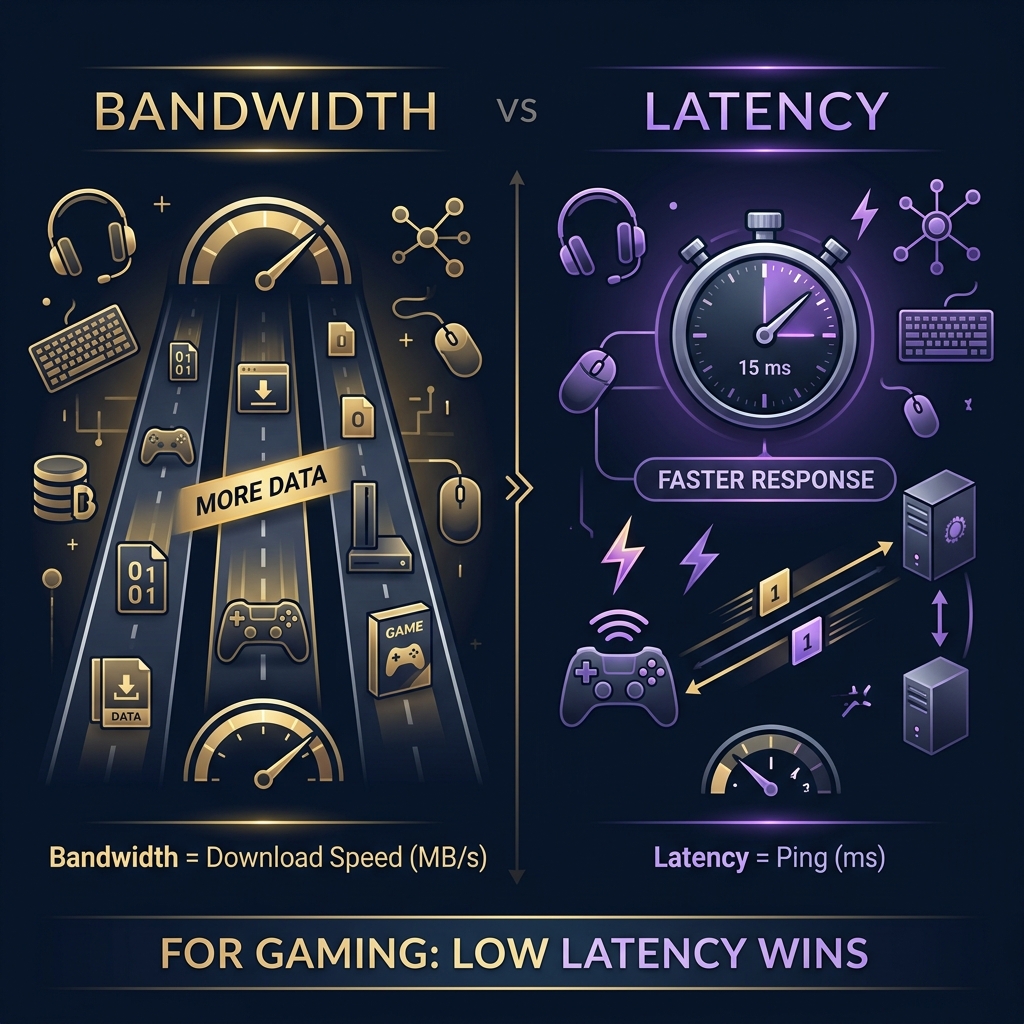
Network Bandwidth
Bandwidth is your strict, immovable physical limit. It doesn’t matter how fast an Amazon server can send you a file, nor does it matter how quickly your NVMe solid-state drive can write the data. If the “highway” connecting your house to the ISP is functionally capped at 50 Mbps, that bottleneck controls the speed of the entire operation.
Latency and Congestion
Latency measures the exact time it takes for a signal to physically travel from Source A to Destination B. Data traveling from London to Sydney inevitably encounters a greater physical delay than data crossing a room. Additionally, “noise” on the line (network congestion during peak neighborhood usage hours) causes routers to drop communication packets, forcing them to be retransmitted, completely torpedoing your throughput rate.
Protocol Overhead
Data cannot travel “naked.” To successfully cross the internet, information is broken into microscopic “packets.” The TCP/IP network protocol must attach digital shipping labels onto every single packet—instructions dictating where it came from, where it belongs, and how to verify it wasn’t corrupted in transit.
This supplementary envelope data is called overhead, and it silently taxes anywhere from 5% to 15% of your total connection capacity. If you divide your 1000 Mbps fiber line by 8, you’ll calculate a theoretical 125 MB/s maximum limit. Oh, but the TCP/IP shipping labels consume 12 MB/s of that space, dropping your true yield closer to 110-112 MB/s.
Hardware Limitations
A Ferrari engine inside a rusty tractor frame won’t win a race. When analyzing data transfers—especially over local gigabit connections—the internet is rarely the problem. If you’re downloading massive payloads onto a mechanical spinning hard drive (HDD), the physical needle cannot write the incoming bits fast enough. Additionally, utilizing an older Cat5 cable (capped physically at 100 Mbps) or an aging router with weak internal processors will throttle an otherwise premium fiber connection immediately.
Real-World Data Transfer Rate Examples
How does the theory translate into tangible hardware metrics?
Internet Connections
- Budget Cable (50 Mbps): Downloads a 5GB 1080p movie in ~15 minutes realistically. Max yield: ~5.5 MB/s.
- Standard Cable (300 Mbps): The modern backbone. Handles rapid PC downloads while sustaining three concurrent 4K television streams effortlessly. Max yield: ~34 MB/s.
- Gigabit Fiber (1000 Mbps): Overkill for standard web browsing, but mandatory for heavy media professionals. Downloads 100GB AAA games in less than 20 minutes. Max yield: ~112 MB/s.
Use a data transfer calculator to check exact estimations.
Ethernet Networks
Wired local area networks (LANs) typically operate much faster than standard global internet. A standard Gigabit home network utilizes Cat6 cabling transferring files between two internal computers at a sustained clip of roughly 110 MB/s—ten times faster than standard cloud storage pulls.
USB and Storage Devices
- USB 2.0: Painfully dated, maxing out at an abysmal 480 Mbps (roughly 40-60 MB/s max throughput).
- USB 3.2 Gen 2 (USB-C): Pushes data at an astronomical 10 Gbps. That equates to roughly 1,250 Megabytes per second in theory, limited entirely by the speed of the attached drives.
- NVMe SSDs: The modern standard for inside your computer, frequently exceeding transfer capabilities of 7,000 MB/s. The internet simply cannot formulate a connection quick enough to bottleneck an NVMe.
Cloud Storage Transfers
Pulling data directly from Google Drive or Dropbox introduces a new variant: Server-side throttling. Heavy infrastructures intentionally throttle individual user download streams to prevent extreme bandwidth hogs from crashing their mainframes. Consequently, even on a Gigabit line, major cloud hosts rarely surrender files faster than 40-50 MB/s.
Tools for Measuring and Calculating Data Transfer Rates
Relying on mental math alone during a network audit is malpractice. Utilize these solutions.
Online Speed Test Tools
Ookla’s Speedtest.net and Cloudflare’s independent network testing suite assess your pure, unadulterated bandwidth speed in Megabits (Mbps).
Data Transfer Calculators
For instantly bridging the gap between networking bits and file-system bytes, specialized applications offer rapid answers without requiring you to build spreadsheets.
We highly recommend bookmarking our bandwidth calculator alongside our data transfer calculator. They factor in the rigid constraints of both 8-bit conversions and TCP overhead percentages directly into the final metrics.
Network Monitoring Software
For enterprise users needing granular second-by-second analytics, tools like PRTG Network Monitor or SolarWinds dissect throughput traffic. These systems highlight precisely where microscopic bottlenecks emerge—down to the specific struggling server rack.
Common Mistakes When Calculating Data Transfer Rates
Engineers who should know better still commit these foundational sins.
Confusing Mbps and MB/s
The prevailing tragedy of networking. If you misread the capitalized “B”, you miscalculate your duration exactly eightfold. An expected 2-hour transfer abruptly becomes a 16-hour ordeal that destroys deadlines.
Ignoring Network Overhead
When promising a client a timeline, you must strip away 10% to 15% of your calculating metrics. If you estimate using a pristine, unbroken 100% capacity yield, you are mathematically guaranteeing you will miss your target duration. Always factor for protocol taxes.
Using Incorrect Unit Conversions
Mixing up base-10 commercial Gigabytes with base-2 Windows internal estimates causes slight data volume discrepancies. The files always appear larger or smaller than anticipated depending entirely on which operating system’s explorer you utilize to view the file properties.
Frequently Asked Questions
How Do You Calculate Data Transfer Speed?
Identify the total size of the file (usually in Megabytes) and divide it by the total duration of the transfer (in seconds). This calculates the rate in Megabytes per second (MB/s). Multiply that number by eight to determine the Megabits per second (Mbps) network bandwidth utilized.
What Is the Difference Between Mbps and MB/s?
Mbps (Megabits per second) utilizes a lowercase ‘b’ and serves as the universal standard for transporting network data through pipelines. MB/s (Megabytes per second) utilizes an uppercase ‘B’ and serves as the universal standard for tracking files written to computational storage drives. One Byte contains 8 bits.
Why Is Actual Speed Lower Than Advertised Speed?
Your Internet Service Provider advertises the total theoretical bandwidth of the pipeline connecting your house. The actual file speed yielded inherently strips out roughly 10% for “overhead” (digital protocol routing instructions), while remaining permanently hamstrung by Wi-Fi interference and remote site congestion.
How Long Will It Take to Transfer a File?
Determine your network’s actual capability by running a speed test in Mbps. Divide that result by 8. Then multiply the file size (in Megabytes) divided by that new result to calculate the estimated seconds. Or, immediately bypass the mental math by leveraging a designated download time calculator.
Conclusion
Here is your hard pivot away from confusion.
We are surrounded by complex machines, yet the mechanism controlling our connectivity is fundamentally simple: data is electricity measured in binary pulses.
Once you permanently internalize the difference between the swift, traveling bits and the heavy, stored bytes, your perspective flips. You no longer gaze at a crawling progress bar wondering if your ISP is running a scam.
Key Takeaways
- Bandwidth limits the total pipe width; Throughput illustrates the traffic successfully traveling it.
- One Byte consists of exactly eight bits.
- Divide an ISP plan by 8 to reveal the maximum possible download transfer rate in Megabytes.
- Mandate a 10% reduction when anticipating realistic performance to encompass protocol overhead and networking congestion.
Final Thoughts on Data Transfer Rate Calculations
With this knowledge, evaluate your current digital layout. Next time your internet feels frustratingly slow, pull up an interactive calculator and run the math. If your reality doesn’t match the theoretical capabilities discussed here, unplug the Wi-Fi router, plug in an Ethernet cable, and isolate the bottleneck. You now have the exact blueprint to diagnose it.