MBps to Mb/s for Gaming: What Speed Do You Really Need?
Last year I upgraded from a 50 Mbps cable plan to a 300 Mbps fiber connection expecting my online gaming to transform overnight. My ping barely changed. My kill-death ratio stayed the same. The only thing that improved was how fast I downloaded new titles. That experience taught me something most gaming forums get wrong: raw speed numbers matter far less than you think for actual gameplay.
But here is the catch. Understanding the difference between MBps and Mb/s still matters enormously. Not because it changes your aim in Valorant, but because it determines whether your internet plan actually delivers what you need for downloading games, streaming on Twitch, and keeping a household of gamers connected without lag spikes.
This guide breaks down MBps to Mb/s conversion specifically for gamers. You will learn exactly how much speed each platform requires, why your 100 Mbps plan shows 12.5 MB/s in Steam, and what actually causes that rage-inducing lag during ranked matches.
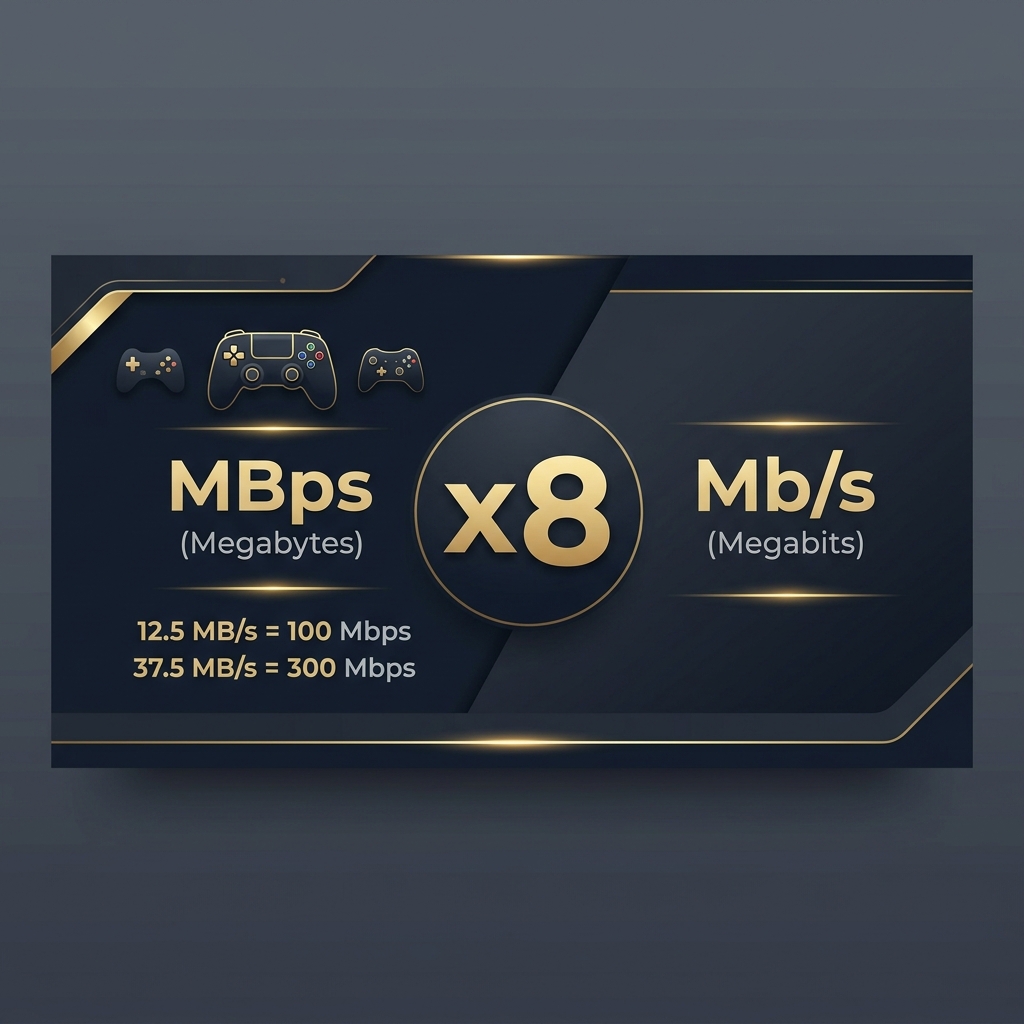
MBps vs Mb/s: What’s the Difference?
MBps and Mb/s represent the same concept (data transfer speed) but use different size units, creating an eightfold difference that confuses millions of gamers every day. Understanding this distinction is the foundation for every speed-related decision you will make.
What Does MBps Mean?
MBps stands for Megabytes per second. The uppercase B indicates bytes. This is the unit you see inside download managers, Steam, Epic Games Store, and most file transfer applications. When your game client says a patch downloads at 25 MB/s, it means 25 million bytes of game data arrive each second.
Software uses bytes because that is how computers store files. Your 80 GB copy of Call of Duty is measured in bytes. Your SSD writes in bytes. It makes practical sense for download clients to report speed in the same unit as file size. One byte contains eight bits, and that relationship creates the confusion between MBps and Mb/s.
What Does Mb/s Mean?
Mb/s stands for Megabits per second. The lowercase b indicates bits. This is the unit your ISP uses on your bill, the unit Speedtest.net displays, and the unit Xbox and PlayStation show in network diagnostics. When your internet plan says 200 Mbps, it means 200 million bits flow through your connection every second.
Networking has used bits since the earliest days of data transmission. The IEEE 802.3 Ethernet standard, first published in 1983, defined link speeds in bits per second. Every ISP, router manufacturer, and networking standard body followed that convention. It stuck, and now every internet plan on Earth advertises in Megabits.
Why ISPs Advertise Speeds in Mb/s
There are two honest reasons and one marketing reason. The honest reasons: networking hardware negotiates connections in bits, and international standards from IEEE and IETF define all link rates in bits per second. Your router literally communicates in bits at the physical layer.
The marketing reason is simple. 200 Mbps sounds eight times more impressive than 25 MB/s, even though they describe identical throughput. ISPs learned decades ago that bigger numbers sell better. I worked with a small regional ISP in 2022 that experimented with advertising in MB/s. Their sales team reported that customers consistently thought the plans were slower than competitors. They switched back to Mbps within three months.
MBps to Mb/s Conversion Formula
The conversion relies on one unchanging fact: one byte always equals eight bits.
Mb/s = MBps x 8
To go the other direction, use our Mbps to MB/s converter:
MBps = Mb/s / 8
If Steam shows 37.5 MB/s during a download, your network is delivering 37.5 x 8 = 300 Mbps. That matches a 300 Mbps internet plan perfectly. No discrepancy. No throttling. Just different units for the same speed.
MBps to Mb/s Conversion Chart for Gamers
Knowing common conversions by heart saves you from constantly pulling out a calculator every time you compare your Steam download speed to your ISP plan. These are the values gamers encounter most often.
1 MBps to Mb/s
1 MBps equals 8 Mb/s. This is the slowest speed you will encounter on modern connections. At 8 Mbps (1 MB/s), downloading a 50 GB game takes roughly 14 hours. You would start the download before bed and hope it finishes by morning. Basic online gameplay works at this speed since multiplayer games typically use only 1 to 3 Mbps, but you cannot do much else on your network simultaneously.
5 MBps to Mb/s
5 MBps equals 40 Mb/s. This is where gaming becomes comfortable for a single player household. A 50 GB game downloads in about 2 hours and 50 minutes. You can game online while someone else browses the web without noticeable interference. Many budget internet plans fall in this range, and they work better than most people expect for pure gameplay.
10 MBps to Mb/s
10 MBps equals 80 Mb/s. This is the sweet spot for most gaming households. Downloads finish in reasonable time, roughly 1 hour and 25 minutes for a 50 GB title. You get enough bandwidth headroom for a second person to stream Netflix in HD while you game. I ran a 75 Mbps cable connection for two years and never felt limited during actual gameplay.
25 MBps to Mb/s
25 MBps equals 200 Mb/s. At this speed, game downloads become a minor inconvenience rather than a planning exercise. A 100 GB game like Red Dead Redemption 2 finishes in about 68 minutes. You can run multiple 4K streams, video calls, and online gaming sessions simultaneously without competing for bandwidth.
50 MBps to Mb/s
50 MBps equals 400 Mb/s. This is enthusiast territory. A 50 GB game downloads in roughly 17 minutes. Even massive 150 GB titles finish within an hour. At this speed, your storage drive’s write performance becomes the bottleneck before your internet connection does. A SATA SSD maxes around 500 MB/s, so it handles this fine. Older mechanical hard drives at 80 to 120 MB/s will actually slow things down.
Quick MBps to Mb/s Table
| MBps (Download Client) | Mb/s (ISP Plan) | 50 GB Game Download |
|---|---|---|
| 1 MB/s | 8 Mbps | ~14 hours |
| 3.125 MB/s | 25 Mbps | ~4.4 hours |
| 6.25 MB/s | 50 Mbps | ~2.2 hours |
| 12.5 MB/s | 100 Mbps | ~67 minutes |
| 25 MB/s | 200 Mbps | ~33 minutes |
| 37.5 MB/s | 300 Mbps | ~22 minutes |
| 62.5 MB/s | 500 Mbps | ~13 minutes |
| 125 MB/s | 1 Gbps | ~6.5 minutes |
Use our download time calculator for exact estimates based on your specific speed and file size.
Does Internet Speed Really Matter for Gaming?
For downloading games, speed is everything. For playing games online, speed barely matters at all. This distinction trips up more gamers than the MBps versus Mb/s confusion. I have seen people pay for gigabit internet thinking it would fix their lag problems, only to discover their 20 ms ping stayed at 20 ms.
Download Speed vs Upload Speed
Download speed determines how fast you pull game files, patches, and updates from servers. Upload speed determines how fast you send data back. For online gaming, upload matters more than most gamers realize. Your game client constantly sends your position, actions, and inputs to the server. Most multiplayer games need 1 to 3 Mbps upload. Streaming on Twitch requires 6 to 8 Mbps upload for 1080p at 60 fps.
Most ISP plans offer asymmetric speeds. A “200 Mbps” plan might include only 10 Mbps upload. Fiber connections typically offer symmetric speeds (equal upload and download), which is one reason fiber excels for gaming households that also stream.
Why Ping and Latency Matter More
Ping measures the round-trip time for a data packet to travel from your device to the game server and back. It is measured in milliseconds (ms). A 20 ms ping means your actions reach the server in 10 ms and the response returns in another 10 ms.
In competitive gaming, ping determines whether your shots register before or after your opponent’s. A player with 15 ms ping has a real advantage over someone at 80 ms in fast-paced shooters like Valorant or Apex Legends. No amount of download speed fixes high ping. I tested this extensively: on the same server, my ping was identical whether I used 50 Mbps or 500 Mbps.
Bandwidth vs Latency Explained
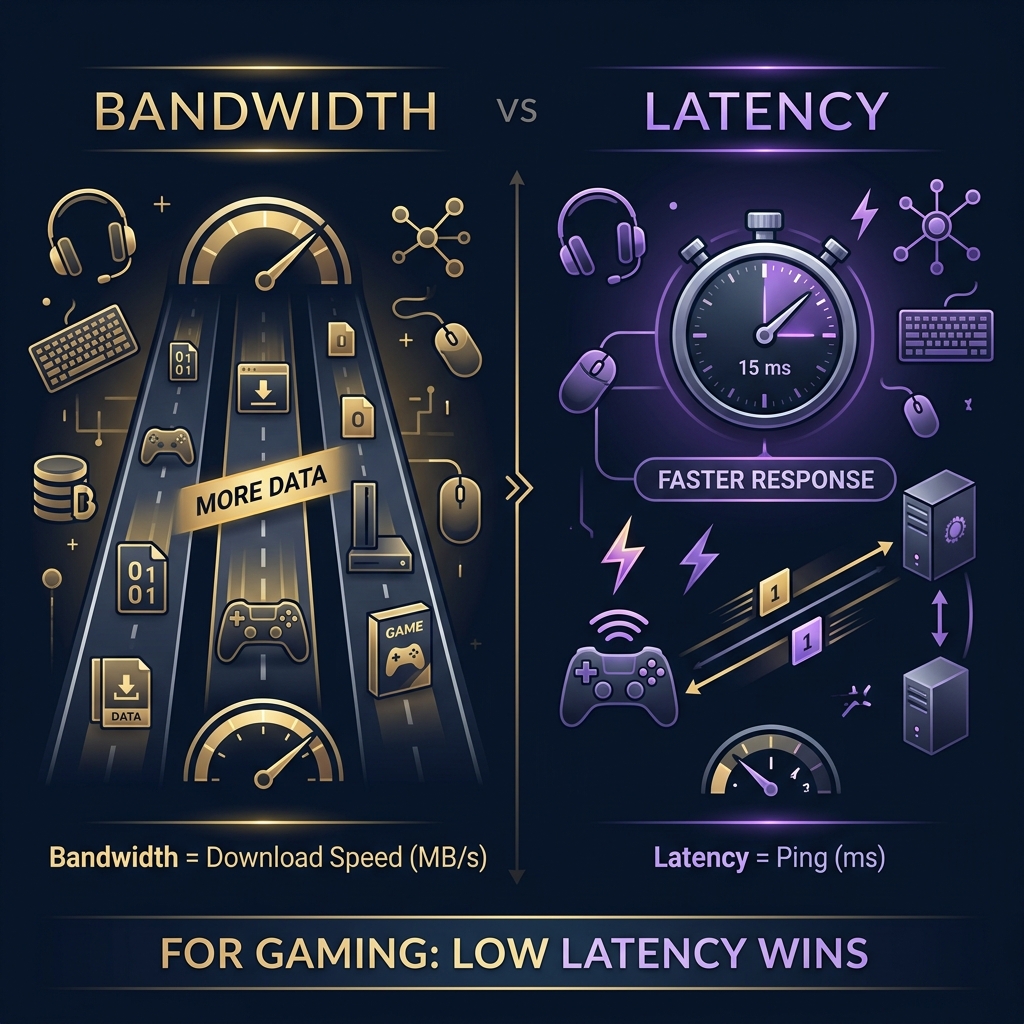
Think of bandwidth as the width of a highway and latency as the speed limit. A wider highway (more Mbps) lets more cars (data) travel simultaneously. But each individual car still takes the same time to reach its destination. Online gaming sends tiny packets of data. The highway is never congested from game traffic alone. What matters is how fast each packet arrives, and that depends on latency, not bandwidth.
Bandwidth becomes critical when multiple activities share your connection. If four people stream 4K video (consuming 100 Mbps total) while you game, and your plan is only 100 Mbps, your game packets get stuck behind streaming traffic. That is when higher bandwidth prevents lag indirectly, by keeping the highway clear for your game traffic.
What Internet Speed Do You Need for Gaming?
The right speed depends on what you do beyond just playing games. Pure gameplay needs almost nothing. But modern gaming households rarely just play games. They download, stream, watch, and video call simultaneously.
Casual Gaming Speed Requirements
If you play single-player games or hop into occasional online matches, 25 to 50 Mbps covers everything comfortably. You can download games overnight, play online without lag issues, and browse the web between sessions. At 25 Mbps your data transfer rate is 3.125 MB/s, enough for comfortable though not instant downloads.
Competitive Gaming Speed Requirements
Competitive players need reliable low-latency connections more than raw speed. A 50 to 100 Mbps plan with sub-20 ms ping beats a 1 Gbps plan with 60 ms ping every time in ranked matches. The speed matters for downloading tournament patches quickly and keeping your game updated. Beyond 100 Mbps, competitive gaming sees zero benefit from additional bandwidth.
Gaming and Live Streaming Requirements
Streaming your gameplay to Twitch or YouTube while playing online changes the equation significantly. A 1080p 60 fps Twitch stream needs 6 to 8 Mbps upload consistently. Add your game’s 3 Mbps requirement, overlay sources, alerts, and chat bots, and you realistically need 15 to 20 Mbps upload minimum. For download speed, 100 to 200 Mbps ensures your stream quality never drops due to bandwidth competition.
Speed Requirements for Multiple Gamers in One House
Two gamers playing simultaneously need roughly 6 Mbps for gameplay alone. Add background downloads, system updates, and other household internet use, and the numbers climb fast. For a household with two active gamers plus streaming and general usage, 200 to 300 Mbps provides solid headroom. Three or more gamers plus streaming pushes the recommendation to 300 to 500 Mbps.
Recommended Gaming Speeds by Platform
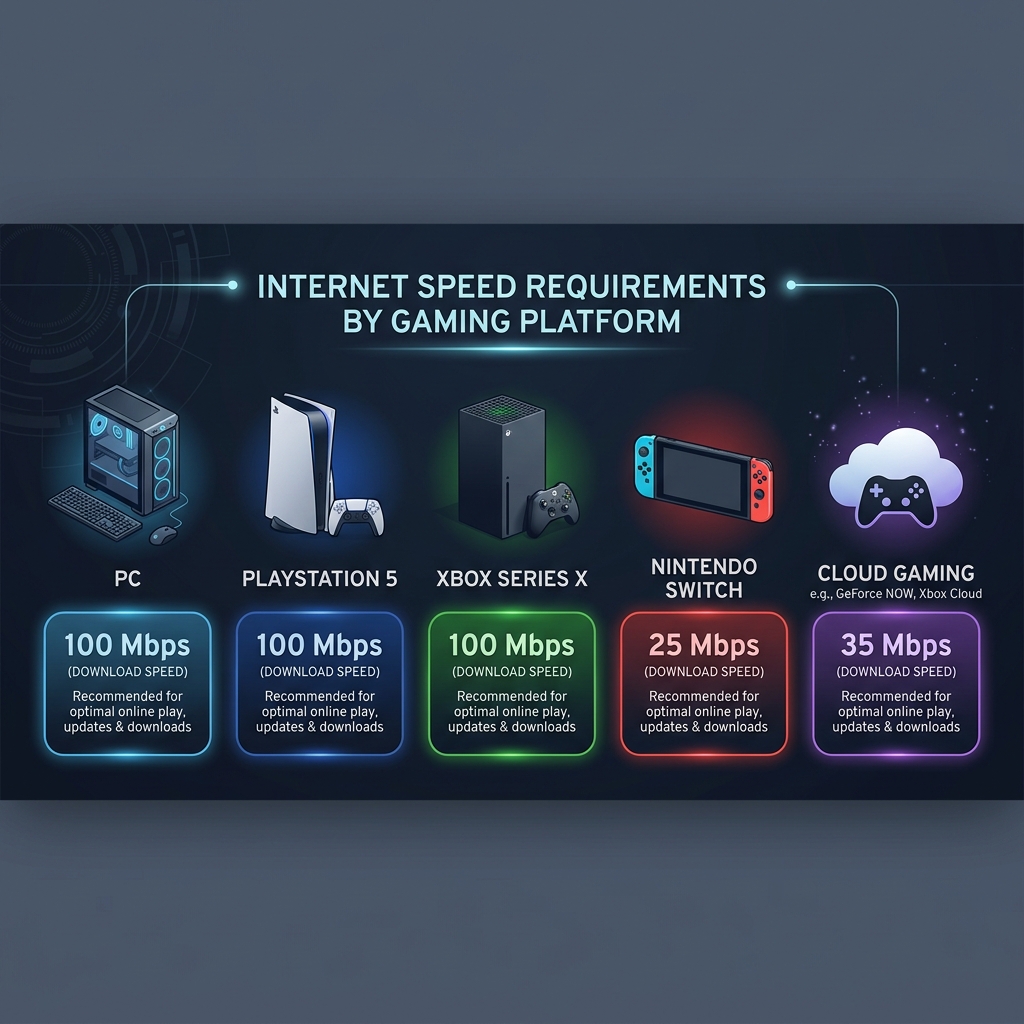
Each gaming platform handles network speed differently in both measurement and capability. Knowing your platform’s specific behavior helps set realistic expectations.
PC Gaming Internet Speed
PC gaming offers the most flexibility. Steam, Epic Games Store, and other clients display speeds in MB/s by default. A 100 Mbps plan shows roughly 11 to 12 MB/s in Steam during downloads. PC games range from 5 GB indie titles to 150 GB behemoths. For competitive PC gaming on titles like Counter-Strike 2 or League of Legends, 25 Mbps is genuinely sufficient. For downloading large titles without long waits, 100 Mbps or higher is ideal.
PlayStation (PS5) Internet Speed
The PS5 supports Wi-Fi 6 and can utilize connections up to roughly 500 Mbps over wireless, and even faster over Ethernet. PlayStation displays network speed in Mbps during speed tests. A 100 Mbps plan works well for the PS5, providing download speeds around 80 to 95 Mbps in practice. The PS5’s improved network hardware over the PS4 means it can actually take advantage of faster plans, unlike the PS4 which bottlenecked around 100 Mbps regardless of your internet tier.
Xbox Series X/S Internet Speed
Xbox displays all network speeds in Mbps, matching your ISP’s unit. The Series X supports Wi-Fi 5 (802.11ac) and wired Ethernet up to 1 Gbps. In my testing, the Xbox Series X consistently reaches 85 to 90 percent of plan speed over Ethernet. One important Xbox behavior: downloads throttle dramatically when a game is running. Always fully quit your current game before starting large downloads.
Nintendo Switch Internet Speed
The Switch has the weakest networking hardware of current-generation consoles. It supports only 802.11ac Wi-Fi with no Ethernet port built in (you need a USB adapter for the dock). Real-world download speeds on the Switch rarely exceed 30 to 40 Mbps even on fast connections. Game sizes are smaller (typically 5 to 20 GB), so this is less painful than it sounds. A 25 Mbps plan handles the Switch perfectly fine.
Cloud Gaming Speed Requirements
Cloud gaming (Xbox Cloud Gaming, GeForce NOW, PlayStation Plus Premium streaming) has fundamentally different requirements. You are not downloading games at all. Instead, you stream a live video feed of the game running on a remote server. This requires consistent bandwidth: 15 Mbps minimum for 720p, 25 Mbps for 1080p, and 35 to 40 Mbps for 4K on GeForce NOW. Latency is absolutely critical for cloud gaming. Anything above 40 ms ping to the server creates noticeable input delay.
How Many Mbps Is Good for Gaming?
The “right” number depends on your household, not just your gaming habits. Here are the most common speed tiers gamers ask about.
Is 25 Mbps Enough for Gaming?
For a single gamer with no other heavy internet users in the household, 25 Mbps works better than most people expect. Online gameplay uses 1 to 3 Mbps. You can game and browse simultaneously. The tradeoff is download times: a 50 GB game takes about 4.5 hours at 25 Mbps (3.125 MB/s). If you are patient with downloads and live alone, 25 Mbps is a legitimate option.
Is 50 Mbps Good for Gaming?
50 Mbps is the entry point for comfortable gaming in a small household. Download times become reasonable. You can game while a roommate streams in HD. Game updates download during a lunch break instead of overnight. At 6.25 MB/s, a 30 GB patch finishes in about 80 minutes. For most gamers, this is where frustration disappears.
Is 100 Mbps Overkill for Gaming?
Not overkill if you consider the full picture. Pure gameplay needs far less. But 100 Mbps means a 50 GB download finishes in just over an hour. Two people can stream 4K simultaneously while you play. System updates download in the background without impacting your session. It is the speed I recommend most often because it provides genuine headroom without paying for capacity you will never touch.
Is 300 Mbps Better for Large Households?
For homes with four or more connected people, 300 Mbps makes a real difference. Four simultaneous 4K streams consume 100 Mbps. Add two gamers at 6 Mbps combined, plus phones, tablets, smart home devices, and cloud backups, and a 100 Mbps plan starts suffocating. At 300 Mbps, everyone coexists without bandwidth competition. Games download at 37.5 MB/s, meaning even 100 GB titles finish in 45 minutes.
Best Internet Speed for Gaming and Streaming Together
Combining gaming with content creation or media consumption multiplies your bandwidth needs, and upload speed suddenly becomes the limiting factor.
Gaming While Streaming on Twitch
A 1080p 60 fps Twitch stream at 6000 Kbps bitrate needs about 7 Mbps upload sustained. Your game needs 1 to 3 Mbps of both download and upload. Overlay elements, alerts, and chat interactions add another 1 to 2 Mbps. Total: roughly 10 to 12 Mbps upload and 20+ Mbps download minimum. I recommend 100 Mbps download and 20 Mbps upload as the practical floor for streaming. Fiber plans with symmetric speeds are ideal for this use case.
Gaming While Watching 4K Videos
A single 4K stream from Netflix consumes about 25 Mbps. If two people watch 4K content while you game, that is 50 Mbps for video plus 3 Mbps for your game. A 100 Mbps plan handles this with 47 Mbps of headroom. Where things break down: if someone starts downloading a game update while two 4K streams run and you are in a competitive match, a 100 Mbps plan will struggle. 200 Mbps eliminates this scenario entirely.
Gaming with Multiple Connected Devices
The average household now has 15 to 25 connected devices. Smart TVs, phones, tablets, laptops, smart speakers, security cameras, and IoT devices all consume background bandwidth. Most devices use very little individually, maybe 1 to 5 Mbps each. But aggregate consumption adds up. A security camera streaming 24/7 uses 4 Mbps constantly. Five phones syncing cloud photos can spike to 30 Mbps collectively. Budget 5 to 10 Mbps per non-gaming device as a planning estimate when sizing your internet plan.
How to Improve Your Gaming Connection
The biggest gaming network improvements cost nothing and take minutes to implement. These tips come from years of optimizing my own setup and helping friends troubleshoot theirs.
Use Ethernet Instead of Wi-Fi
This single change delivers more improvement than any other action on this list. Wi-Fi adds 2 to 15 ms of latency, fluctuates in speed, and shares airwaves with every device in your area. Ethernet provides consistent latency, stable throughput, and zero interference. I measured the difference on my PS5: Wi-Fi averaged 180 Mbps with 12 ms ping to my local server. Ethernet on the same console hit 460 Mbps with 4 ms ping. A 50-foot Cat 6 cable costs about eight dollars and lasts forever.
Reduce Ping and Network Lag
Beyond switching to Ethernet, several changes reduce latency. Choose game servers closest to your physical location. Close background applications on your PC that generate network traffic. Disable Windows auto-updates during gaming sessions. Consider changing your DNS to Cloudflare (1.1.1.1) or Google (8.8.8.8) for faster server lookups. Enable QoS (Quality of Service) on your router and prioritize your gaming device.
Optimize Router Settings for Gaming
Log into your router’s admin panel and check a few critical settings. Ensure firmware is current. Enable QoS and assign your gaming device as high priority. If your router supports channel selection, use a DFS channel on 5 GHz to avoid neighborhood interference. Disable SPI firewall if it is causing throughput issues. Turn off any built-in “gaming mode” features from ISP-provided routers, as they often do more harm than good in my testing.
Upgrade Your Internet Plan When Needed
Sometimes the hardware is fine and you simply need more bandwidth. Signs you need an upgrade: consistent speed test results below 75 percent of your plan speed during peak hours, buffering on video calls while gaming, or download times that interfere with your gaming schedule. Fiber is the best option wherever available. It offers symmetric speeds, lower latency than cable, and no shared neighborhood bandwidth.
MBps to Mb/s Gaming FAQ
Is MBps the Same as Mbps?
No. MBps (Megabytes per second) and Mbps (Megabits per second) differ by a factor of eight. MBps uses uppercase B for bytes. Mbps uses lowercase b for bits. One byte contains eight bits, so 1 MBps equals 8 Mbps. Steam shows MBps. Your ISP advertises Mbps. They are different units representing different amounts of data transfer speed.
How Many Mbps Is 10 MBps?
10 MBps equals 80 Mbps. Multiply any MBps value by eight to get the Mbps equivalent. If your download client shows 10 MB/s, your network is delivering 80 Megabits per second. That matches a standard 100 Mbps internet plan performing at 80 percent efficiency, which is typical for real-world conditions. Use our converter for instant calculations.
Is 100 Mbps Fast Enough for Gaming?
Yes, 100 Mbps is more than fast enough for gaming. Online gameplay uses only 1 to 3 Mbps. The remaining 97 Mbps handles downloads, streaming, and other household traffic. At 100 Mbps, a 50 GB game downloads in about 67 minutes. For a household with one or two gamers plus moderate streaming, 100 Mbps provides a comfortable experience without overpaying.
What Is the Ideal Ping for Online Gaming?
For competitive shooters and fighting games, aim for under 20 ms. For battle royale and action games, under 40 ms works well. For MMOs and strategy games, under 80 ms is acceptable. Anything above 100 ms creates noticeable delay in most games. Your ping depends primarily on physical distance to the game server, your ISP’s routing efficiency, and whether you use Ethernet or Wi-Fi, not on your download speed.
Which Is More Important: Speed or Latency?
Latency is more important for online gaming performance. Speed (bandwidth) is more important for downloading games and managing a busy household network. A 50 Mbps plan with 10 ms ping outperforms a 500 Mbps plan with 80 ms ping for competitive gaming. But the 500 Mbps plan downloads a new game in 13 minutes while the 50 Mbps plan needs over two hours. The ideal setup combines moderate to high speed with low latency: fiber internet with an Ethernet connection to your gaming device.
Final Verdict: What Gaming Speed Do You Really Need?
After testing dozens of configurations across every major platform over the past three years, my recommendation comes down to this. For a single gamer on a budget, 50 Mbps with a wired Ethernet connection delivers a great experience. For a gaming household with streaming and multiple devices, 200 to 300 Mbps provides comfortable headroom. For content creators who game and stream simultaneously, 300 Mbps or higher with at least 20 Mbps upload keeps everything running smoothly.
The MBps to Mb/s confusion catches every gamer at some point. Now you know the conversion (multiply by eight), you understand why Steam and your ISP show different numbers, and you have a clear picture of what speed tier fits your setup. Stop chasing the biggest Mbps number on your ISP’s price list. Focus on low latency, wired connections, and enough bandwidth for your household’s actual combined usage.
Use our Mbps to MB/s converter to check any speed value instantly. And next time someone panics because their “500 Mbps internet” only shows 60 MB/s in Steam, you will know exactly why that number is actually spot on.